Scenario
We are researching options to make it easier for our users to achieve the subject in the next version. One of the popular scenarios we were aware of from our users was integration of custom controls, often created in Visual Studio using the standard WinForms or ASP.NET WebForms approaches, and primarily designed for presenting data from the XAF application database in some very custom manner so that built-in XAF Property Editors or List Editors were not good for this. For instance, you might want to show a list of records in a fancy grid with cards, image gallery or other controls or modes not integrated by default.
Current solutions and problems
XAF is very extensible framework and offers many ways of integrating custom or third party controls. We noticed that while doing so, feeding these custom controls with data from the application database was often a challenge for our users. This binding is done automatically for built-in forms and data editors, but requires writing some code that will read data via the IObjectSpace.GetObjects<T> method (to respect data security filters) and also listen to the IObjectSpace.Reloaded and other events to handle data updates. Finally, designing a data bound user control in Visual Studio often implies a direct connection to the database or using specialized data sources (e.g., to generate a list of grid columns or pivot fields), which do this for you. The latter forces you to think about obtaining an application connection string at design time, while this dynamic part is changed later in the most cases. Add to this different approaches for Entity Framework and XPO and you will get the whole picture.
New solutions (not yet built-in!)
Briefly, we decided to simplify this scenario. Here are two videos that shows one possible option:ASP.NET: http://www.screencast.com/t/OHhcHD9vy
WinForms: http://www.screencast.com/t/8M8K4eskkYO9
How it works?
In short, the proposed flow is as follows:
1. Create a custom user control
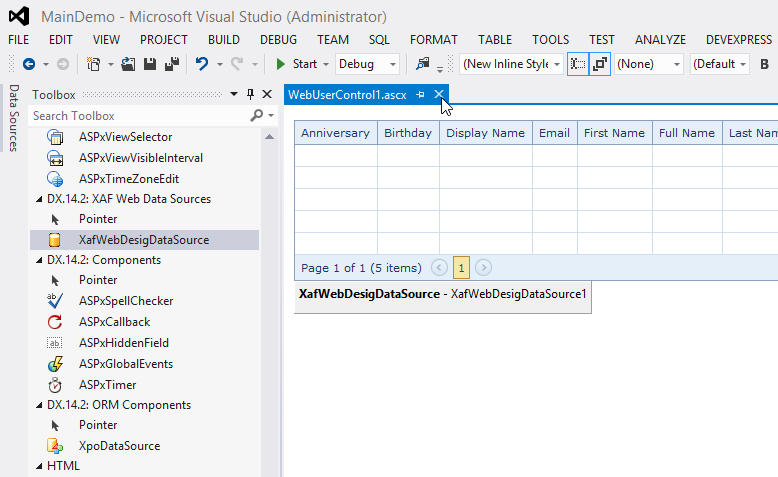
2. Drop a specialized XAF data source from the Toolbox, bind a control to the data source and use the full capabilities of visual designers;
3. Implement an interface by your custom user control and bind it to data obtained from IObjectSpace automatically supplied by XAF at runtime.
4. Use built-in ControlDetailItem or WebUserControlViewItem to link your custom user control with an item within DashboardView.
5. Display that DashboardView from navigation or other places via standard XAF approaches for showing Views.
These approaches are very similar to what we demonstrated in the How to show custom forms and controls in XAF example with the only difference is that it is also possible to customize the user control via the visual designer based on the structure of your business model via a specialized XAF data source component. This component is bound to the real data from IObjectSpace at runtime via the built-in IXafCustomControlWithDataSource interface implemented by your custom user control like in the example.
We recommend creating reusable user controls for such tasks instead of forms, because this way it is easier to embed the control within the built-in DashboardView, which in turn is already well-integrated into the XAF infrastructure. For instance, you won't need to handle Tabbed MDI and other complex situations manually if you use the proposed solution.
Feedback
We are eagerly looking forward to your feedback on this. If you had other difficulties integrating custom controls in XAF, please let us know so we can consider handling them as well.