In short, this feature allows your end-user to sort or group the data inside the grid AND to visualize selected cells, rows with data bars, icons and predefined or custom appearance schemes. Refer to the following XtraGrid documentation for more information on this feature:
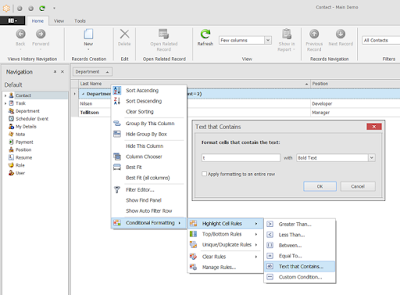
In general, accomplishing this task in an XAF app consists of several independent parts:
1. Enabling, saving and restoring GridFormatRule objects using the standard XtraGrid as per What is the best way to save and restore information just about Conditional Formatting rules in GridControl without using the RestoreLayoutFromXXX and SaveLayoutToXXX methods?
2. Integrating this solution in the GridListEditor using a ViewController as described in the Access Grid Control Properties help topic.
3. Serializing the grid's formatting rules information, taking into account the fact that it uses a different mechanism for storing settings, which is based on the Application Model. In XAF, it is best to extend the ListView node with a string property that will hold a serialization representation of formatting rules. Refer to the How to: Extend the Application Model article for more details.
This C# source file (include it into YourSolutionName.Module project) illustrates how these parts can be joined together in XAF v15.1.6 (vb.net guys can either use this approach OR convert this code into their language using free tools). It is also possible that this code can be simplified in future versions. I will try to keep this Gist updated as well as the corresponding Support Center thread.
Thanks!